Configuring Incremental Aggregate Rebuilds
This section describes how to enable incremental rebuilds for your aggregates.
Prerequisites
To ensure you understand how incremental builds work, you should review the following:
You should also be aware of the following:
-
Allowing incremental rebuilds of aggregates does not cause rebuilds to be incremental. After an aggregate is defined, the AtScale engine determines the type of rebuild it will use for the instances of the aggregate. The first instance of an aggregate is built with a full build. Rebuilds occur to refresh aggregates with new or changed data. After the AtScale engine determines which type of rebuild to use for an aggregate, it always uses that type of rebuild unless the model is edited and redeployed. After redeploying, the AtScale engine again determines which type of rebuild to use for a defined aggregate. The choice that the engine makes can differ from the choice it made for the previous version of the model.
-
You must be sure that any dimensions joined to the dataset you're enabling incremental aggregates for rarely, if ever, change outside of the grace period. The datasets these dimensions are based on should have the Immutable option enabled in the Dataset properties panel, as described in the procedures below.
When the AtScale engine performs an incremental rebuild, it does not search through existing rows in the aggregate to replace old values or include newly appended values. As more changes are made to a dimension outside of the grace period, the aggregate instance becomes less accurate.
If changes are made outside of the grace period, you should trigger a full rebuild of the aggregate table. You can do this from the deployed model's Build tab; for more information, see Performing Full Rebuilds of Incremental Aggregates. However, if changes are made to joined dimensions within the grace period, there is no need for a full rebuild of the aggregate.
For full details on enabling incremental rebuilds of aggregates that use joins, see Aggregates for Fact Datasets that Use Joins.
-
If your incremental aggregates include metrics from multiple fact tables, those metrics must have Override Default Handling enabled and set to Include repeated values in query results. For more information, see About Queries on Dimensions that are Unrelated to One or More Queried Metrics.
Enable view-based incremental aggregate rebuilds
The following sections describe how to configure AtScale to perform its standard, view-based incremental aggregate rebuilds.
Configure AtScale to perform view-based incremental aggregate builds
First, you must configure AtScale to perform view-based incremental builds using the following settings. These are available at both the global and model levels.
aggregate.incrementalUpdate.enabled: Enables AtScale to perform incremental aggregate builds. Set this totrue.aggregate.incrementalUpdates.immutable.enabled: Controls the immutability check for secondary tables. Set this totrueif you're configuring incremental builds of aggregates that use joins on rarely changing dimensions.aggregate.incrementalUpdate.partition.enabled: Determines whether AtScale performs partitioned incremental aggregate builds. Ensure this is set tofalseif you want to perform view-based incremental builds.
Configure view-based incremental aggregate builds in your model
Next, you must configure your models to support view-based incremental aggregate builds:
-
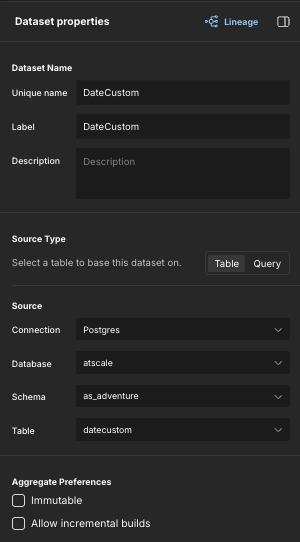
In Design Center, locate the fact table you want to enable incremental builds for, and open it for editing. The Dataset properties panel opens.
-
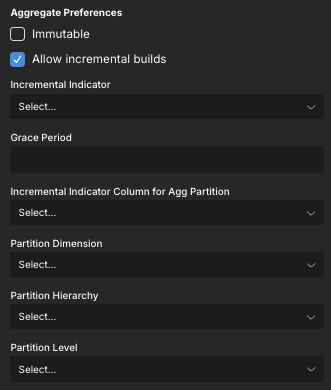
In the Aggregate Preferences section at the bottom of the panel, enable the Allow incremental builds option. Additional fields appear in the Aggregate Preferences section.
-
In the Incremental Indicator field, select the column to use as the incremental indicator.
The dropdown list shows available columns with the following data types: Long, Integer, Timestamp, DateTime, or Decimal (38,0) (Snowflake only). The column you select must have values that increase monotonically, such as a numeric UNIX timestamp showing seconds since epoch, or a Timestamp/DateTime. The values in this column enable the query engine both to append rows to an aggregate table and update rows during an incremental rebuild.
NoteIf the dataset does not contain a column that meets this criteria, you may have to create a calculated column to transform another column into a supported data type.
-
In the Grace Period field, specify the grace period.
When the AtScale engine starts an incremental build, the grace period determines how far back in time the engine looks for updates to rows in the dataset; for example, one week or 15 days. The value you specify should be in one of the following formats:
- If the Incremental Indicator column is a Date-like type (Timestamp, Date, DateTime, and timezone-aware variants), the value should be an integer, followed by the time unit. The time unit can be any of the following:
s(second),m(minute),h(hour),d(day),w(week). For example, setting the value to100ssets the grace period to 100 seconds. Setting it to1wsets the grace period to one week. - If the Incremental Indicator column is an Integer-like type (Long, BigInt, Int, etc.), the value should be a number that matches the encoding used in the database column.
- If the Incremental Indicator column is a Date-like type (Timestamp, Date, DateTime, and timezone-aware variants), the value should be an integer, followed by the time unit. The time unit can be any of the following:
-
Click Apply.
-
If the fact table you're enabling incremental rebuilds for uses joins on rarely changing dimensions, do the following for each dataset those dimensions are based on:
-
Open the dimensional dataset for editing. The Dataset properties panel opens.
-
At the bottom of the panel, in the Aggregate Preferences section, enable the Immutable option.

-
Click Apply.
-
-
Deploy the catalog.
Enable partition-based incremental aggregate rebuilds
Partition-based incremental aggregates are a Public Preview feature.
Although AtScale's standard, view-based incremental aggregate functionality accelerates aggregate build times, it also adds a significant run-time penalty to report queries that select from incrementally built aggregate tables.
If you have encountered this issue, you may want to enable AtScale's partition-based incremental aggregates. This functionality leverages the data warehouse's native partition (or cluster block) pruning capabilities when building and querying incremental aggregates, thereby reducing the run-time query overhead observed in the view-based implementation.
Partition-based incremental aggregates are only supported for the following data warehouse platforms: Snowflake, Databricks, BigQuery, Redshift.
The following sections describe how to configure AtScale to perform partition-based incremental aggregate builds.
Configure AtScale to perform partition-based incremental aggregate builds
When you switch from view-based incremental aggregates to partition-based, AtScale deactivates all existing incrementally built aggregates and builds new ones. Depending on the data sizes involved, this may take a significant amount of time and should be planned for. The shorter build time of partition-based incremental aggregates will be achieved on subsequent builds.
First, you must configure AtScale to perform partition-based incremental builds using the following settings:
aggregate.incrementalUpdate.enabled: Enables AtScale to perform incremental aggregate builds. Available at both the global and model levels. Set this totrue.aggregate.incrementalUpdates.immutable.enabled: Controls the immutability check for secondary tables. Available at both the global and model levels. Set this totrueif you're configuring incremental builds of aggregates that use joins on rarely changing dimensions.aggregate.incrementalUpdate.partition.enabled: Determines whether AtScale performs partitioned incremental aggregate builds. Available at both the global and model levels. Set this totrue.tables.create.partitions.maximumEstimatedNumberOfPartitions: Determines the maximum estimated number of partitions to consider acceptable for an instance of an aggregate. Available at the global level. The default value is800. If you will be building system-defined partitioned incremental aggregates, you may want to increase this value to allow for a greater number of partitions.
Configure partition-based incremental builds in your model
Next, you must configure your models to support partition-based incremental aggregate builds:
-
In Design Center, locate the fact table you want to enable incremental builds for, and open it for editing. The Dataset properties panel opens.
-
In the Aggregate Preferences section at the bottom of the panel, enable the Allow incremental builds option. Additional fields appear in the Aggregate Preferences section.
-
In the Incremental Indicator field, select the column to use as the incremental indicator.
The dropdown list shows available columns with the following data types: Long, Integer, Timestamp, DateTime, or Decimal (38,0) (Snowflake only). The column you select must have values that increase monotonically, such as a numeric UNIX timestamp showing seconds since epoch, or a Timestamp/DateTime. The values in this column enable the query engine both to append rows to an aggregate table and update rows during an incremental rebuild.
NoteIf the dataset does not contain a column that meets this criteria, you may have to create a calculated column to transform another column into a supported data type.
-
In the Grace Period field, specify the grace period.
When the AtScale engine starts an incremental build, the grace period determines how far back in time the engine looks for updates to rows in the dataset; for example, one week or 15 days. The value you specify should be in one of the following formats:
- If the Incremental Indicator column is a Date-like type (Timestamp, Date, DateTime, and timezone-aware variants), the value should be an integer, followed by the time unit. The time unit can be any of the following:
s(second),m(minute),h(hour),d(day),w(week). For example, setting the value to100ssets the grace period to 100 seconds. Setting it to1wsets the grace period to one week. - If the Incremental Indicator column is an Integer-like type (Long, BigInt, Int, etc.), the value should be a number that matches the encoding used in the database column.
- If the Incremental Indicator column is a Date-like type (Timestamp, Date, DateTime, and timezone-aware variants), the value should be an integer, followed by the time unit. The time unit can be any of the following:
-
In the Incremental Indicator Column for Agg Partition field, select the column you want to use to map the Incremental Indicator to the partition boundaries. This must be a calculated column on the physical fact table.
-
Edit the following fields to define the dimension level to use as the partition key column:
- Partition Dimension: Select the dimension that contains the level you want to use as the partition key column.
- Partition Hierarchy: Select the hierarchy that contains the level you want to use as the partition key column.
- Partition Level: Select the level you want to use as the partition key column. The key of this level must not be a string.
-
Click Apply.
-
If the fact table you're enabling incremental rebuilds for uses joins on rarely changing dimensions, do the following for each dataset those dimensions are based on:
-
Open the dimensional dataset for editing. The Dataset properties panel opens.
-
At the bottom of the panel, in the Aggregate Preferences section, enable the Immutable option.
-
Click Apply.
-
-
Deploy the catalog.
Example
You must follow these steps if you want the AtScale engine to perform incremental aggregate rebuilds for joined dimensions.
Suppose you have a model with four dimensions: Customer, Date, Order, and Product. The datasets these dimensions are based on have the Immutable option set as follows:
| Dimension | Immutable |
|---|---|
| Customer | True |
| Date | True |
| Order | False |
| Product | False |
After you deploy the model and queries start to run against it, the AtScale engine defines the following aggregates and creates instances of them:
| Name of Aggregate | Included Dimensions | Possible Types of Rebuild |
|---|---|---|
| Agg A | Customer | Full, Incremental |
| Agg B | Order | Full |
| Agg C | Customer, Date | Full, Incremental |
| Agg D | Order, Product | Full |
| Agg E | Customer, Order | Full |
| Agg F | Customer, Date, Order, Product | Full |
The engine will not perform incremental rebuilds if the following conditions are true:
- A proposed aggregate definition contains a join to at least one dimension that is not declared safe for incremental rebuilds.
- The
aggregate.create.joins.allowPreventIncremental.enabledglobal setting is set totrue.
In this case, a full rebuild is used whether the aggregate is defined by the AtScale engine or a data modeler.
If aggregate.create.joins.allowPreventIncremental.enabled is set to false, then the aggregate table will use incremental rebuilds, but will not join to dimensions that are unsafe for incremental rebuilds.