Working with Slowly Changing Dimensions
Slowly changing dimensions (SCDs) are used in business intelligence to track how dimension data (like a customer’s address or a product's category) changes over time. Instead of overwriting old values, SCDs keep historical records. This allows analysts to see what data was available at the time of the transaction, which is critical for audit trails, machine learning, and accurate reporting.
AtScale supports SCDs without requiring surrogate keys, instead using natural keys and non-equi joins on transaction dates and "effective" dimension dates. This enables analysts to realize typical SCD functionality while eliminating the need to look up and insert surrogate keys either at transaction time or later during an ETL process. As a result, the runtime performance of the data collection application is increased, and its complexity and maintenance cost are reduced.
Support for slowly changing dimensions is a Public Preview feature.
The following sections describe SCD functionality in AtScale.
Overview of SCD functionality in AtScale
Slowly changing dimensions
To define an SCD, you first define a level within the dimension as an SCD level, then create a relationship between that level and a column in the fact table.
The SCD level contains the following:
-
A dimension key, or natural key. Similar to a standard dimension key, this column stores an unchanging key value for a dimension member. For example, for a US taxpayer, this key would be their Social Security number. This value remains unchanged even if additional versions of the taxpayer record are inserted into the dimension table at a later date.
-
Effective-start and effective-end date columns. These are used in place of traditional surrogate keys to identify the active dimension record for a given point in time.
-
(Optional) A created column, which indicates when a dimension record was created. AtScale uses this to disambiguate dimension records that share the same natural key and have overlapping effective-start and effective-end time spans:
- By default, if this mapping is defined, the engine disambiguates overlapping effectiveness records by choosing the latest record indicated by the "created" value.
- If this mapping is defined and the BI tool user specifies a "created" constraint, the engine resolves the overlapping effective records using the latest dimension record that satisfies both the effectiveness criteria as well as the "created" constraint.
Virtual attributes
AtScale provides the following virtual attributes, which BI tool users can filter SCD levels with:
-
as-of-date: Returns the dimension effective record determined by an arbitrary date set by the BI tool user.
NoteFor SCDs with natural key columns of type Date and DateTime, AtScale automatically generates Date values for as-of-date, for all dates between the SCD's earliest effective-start and latest effective-end dates. This ensures the as-of-date attribute for Date/DateTime SCDs works correctly in BI tools.
-
isLatest: Returns the latest dimension member effective record for a given natural key, as determined by the dimension attribute's effective-end column and the configured behavior of the
isLatestvirtual attribute. For information on configuringisLatest, see Configuration settings for SCD queries below. -
joinOnFactEffectiveKey: Enables/disables historically accurate queries. This attribute can be used to perform a non-historically-accurate aggregation, then flip back to point-in-time-accurate aggregation for subsequent queries, without changing any configuration on the server side. If
joinOnFactEffectiveKeyis not specified in a query, it defaults toTrue.
For examples of how these attributes can be used in queries, see Use cases below.
Virtual filter dimension
Model architects often want to include multiple SCDs in a model. However, this can be cumbersome for BI tool users, as they must manually specify a consistent set of filters for each SCD used in a query. Inconsistent filters can produce unexpected results, which can be frustrating for users.
To address this problem, AtScale provides an SCD virtual filter dimension, which collects user-specified filter constraints and applies them to all SCDs used in a query. This enables BI tool users to set their desired filters on a single SCD.
When using the virtual filter dimension in queries, be aware of the following behavior:
- If a BI tool user sends a query that contains filters on an SCD and the virtual filter dimension, the constraints on the virtual filter dimension override those set on the SCD.
- If the virtual filter dimension attributes are used in a fact query that does not reference any SCDs, they are removed from the query before it is executed.
It is not necessary to have query.factless.ignoreIncidentalFilter set to false to use the virtual filter dimension capability.
You can configure the virtual filter dimension using the following settings, available at both the global and model levels:
query.scd.versionHistory.name: Controls the name of the SCD filter dimension exposed to BI tools. The default value isVersion History.query.scd.versionHistory.folder: The folder in which the virtual filter dimension and hierarchy appear in BI tools.
For more information on these settings, see Query Settings (global level) and Query Settings (model level). For examples of how SCD virtual filter dimensions can be used and queried, see Use cases below.
Create an SCD
Define an SCD level
When defining SCD levels, be aware of the limitations described below.
To define an SCD level:
-
In Design Center, open the dimension you want to add an SCD level to for editing. The Dimension properties panel opens.
-
Add a new level, or open the level you want to set as an SCD level for editing. The Level properties panel opens.
-
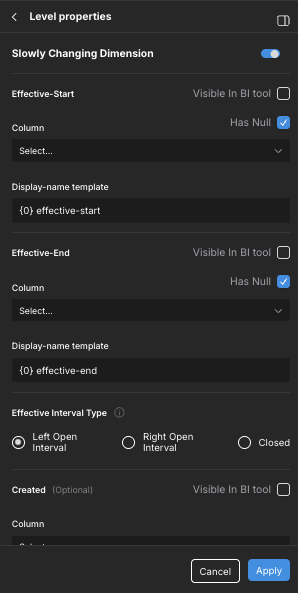
At the bottom of the panel, enable the Slowly Changing Dimension toggle. The Slowly Changing Dimension section expands.
-
Complete the following fields:
-
Effective Start: Defines the effective-start date column used to identify the active dimension record for a given point in time.
-
Column: The effective-start date column. This must be a date-compatible column (Date, DateTime, BigInt).
-
Display-name template: A template defining a suffix to add to the Effective Start column name in BI tools. Use
{0}as a placeholder for the name of the level.For example, given the template
{0} effective-startand a level namedCustomer, the attribute display name would render asCustomer effective-start. -
Visible In BI Tool: Determines whether the Effective Start column appears in BI tools.
-
Has Null: Enable this option if your Effective Start column contains NULL values.
-
-
Effective End: Defines the effective-end date column used to identify the active dimension record for a given point in time.
-
Column: The effective-end date column. This must be a date-compatible column (Date, DateTime, BigInt).
-
Display-name template: A template defining a suffix to add to the Effective End column name in BI tools. Use
{0}as a placeholder for the name of the level.For example, given the template
{0} effective-endand a level namedCustomer, the attribute display name would render asCustomer effective-end. -
Visible In BI Tool: Determines whether the Effective End column appears in BI tools.
-
Has Null: Enable this option if your Effective End column contains NULL values.
-
-
Effective Interval Type: The versioning scheme used by the effective-start and effective-end columns of the dimension's dataset. The following data versioning schemes are supported:
-
Left Open Interval: The effective-start date is exclusive and the effective-end date is inclusive. When retrieving the dimension records, the following constraint will be used:
dim_table.effective-start > fact_table.transaction_date AND dim_table.effective-end <= fact_table.transaction_date -
Right Open Interval: The effective-start date is inclusive and the effective-end date is exclusive. When retrieving the dimension records, the following constraint will be used:
dim_table.effective-start >= fact_table.transaction_date AND dim_table.effective-end < fact_table.transaction_date -
Closed: Both the effective-start and effective-end dates are inclusive. The Created column is used to disambiguate overlapping records.
-
-
Created: Optional. The column that indicates when the dimension record was created. The AtScale engine uses this to disambiguate dimension records that share the same natural key and have overlapping effective-start and effective-end time spans.
-
Column: The created column. This must be a date-compatible column (Date, DateTime, BigInt) and must not contain NULL values.
-
Display-name template: A template defining a suffix to add to the Created column name in BI tools. Use
{0}as a placeholder for the name of the level.For example, given the template
{0} Createdand a level namedCustomer, the attribute display name would render asCustomer Created. -
Visible In BI tool: Determines whether the Created column appears in BI tools.
-
-
As-of-date: Configures the
as-of-datevirtual attribute, making it optionally available for use in query results or filters to report on records that were effective at a specific point in time.-
Display-name template: A template defining a suffix to add to the As-of-date column name in BI tools. Use
{0}as a placeholder for the name of the level.For example, given the template
{0} As-Of-Dateand a level namedCustomer, the attribute display name would render asCustomer As-Of-Date. -
Visible In BI tool: Determines whether the As-of-date column appears in BI tools.
-
-
Is-latest: Configures the
is-latestvirtual attribute, making it optionally available for use in query results or filters to show only the latest version of an SCD record.-
Display-name template: A template defining a suffix to add to the Is-latest column name in BI tools. Use
{0}as a placeholder for the name of the level.For example, given the template
{0} Is Latestand a level namedCustomer, the attribute display name would render asCustomer Is Latest. -
Visible In BI tool: Determines whether the Is-latest column appears in BI tools.
-
-
Join on Fact Effective Key: Configures the display of query results when the
joinOnFactEffectiveKeyvirtual attribute is specified.-
Display-name template: A template defining a suffix to add to the Join on Fact Effective Key column name in BI tools. Use
{0}as a placeholder for the name of the level.For example, given the template
{0} joinOnFactEffectiveKeyand a level namedCustomer, the attribute display name would render asCustomer joinOnFactEffectiveKey. -
Visible In BI tool: Determines whether the Join on Fact Effective Key column appears in BI tools.
-
-
-
Click Apply in the Level properties panel.
-
Click Apply in the Dimension properties panel.
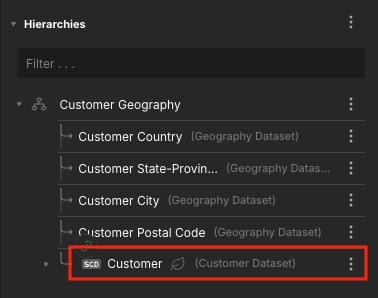
The level appears in the Hierarchies section of the Dimension properties panel, with an SCD label.
Create the relationship from the SCD level to the fact table
Next, you need to define the relationship between the SCD level and a fact table column.
To create the relationship:
-
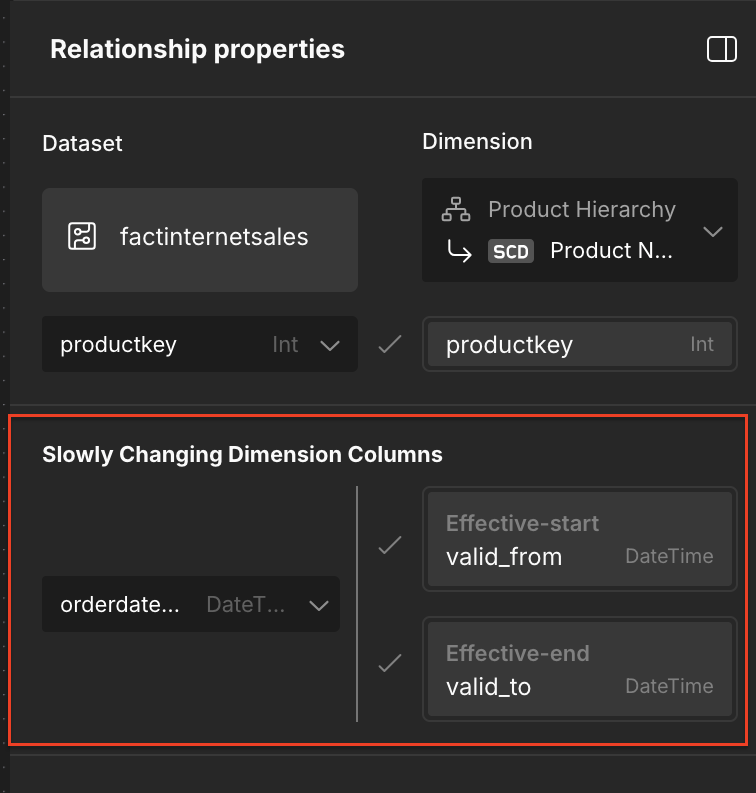
On the model Canvas, click and drag a fact table column to the SCD dimension. The Relationship properties panel opens.
-
On the fact dataset side of the relationship, identify which column contains the natural key.
-
In the Dimension field, select the SCD level.
-
In the Slowly Changing Dimension Columns section, on the left side, specify which column of the fact dataset represents the effective time of the transaction that can be used to compare to the dimension effective-start and effective-end columns on the right side.
-
Click Apply.
Use cases
Use cases for dimension-only queries (filter or slicer queries)
Basic query
The following query returns one record for each combination of natural key, created, effective-start, and effective-end. Dimension members with multiple versions will have multiple rows in the results.
SELECT [Customer].[Customer Geography].[Customer] from ASAdventureSmall
Filter dimension-only queries by as-of-date criteria
The following queries return only the dimensional records that were effective at a specific point in time (the as-of-date virtual attribute). The as-of-date attribute is set on a per-dimension basis.
The following uses the SCD level [Customer].[Customer Geography].[Customer]. Note that the SCD virtual attribute has a similar syntax to that of a level alias.
Select [Customer].[Customer Geography].[Customer] from ASAdventureSmall where [Customer].[Customer as-of].[Customer as-of] = '2025-08-01'
Filter dimension-only queries by isLatest criteria
Dimension filter values can be restricted to show only the latest dimension values by including the virtual attribute isLatest. isLatest is set on a per-dimension basis:
Select [Customer].[Customer Geography].[Customer] from ASAdventureSmall where [Customer].[Customer Is Latest].[Customer Is Latest] = True
Filter dimension-only queries by created date criteria
The created virtual attribute disambiguates dimension records that may have overlapping effective date ranges. created is set on a per-dimension basis:
Select [Customer].[Customer Geography].[Customer] from ASAdventureSmall where [Customer].[Customer Created].[Customer Created] < "2025-09-01 09:00:00"
Fact query use cases
In the following examples, assume that the Customer dimension uses SSN (Social Security number) as the unchanging natural key, and contains effective-start, effective-end, and created column mappings.
Fact-effective, group by level alias
SELECT Customer.Name, Sum(Sales) FROM TheCube GROUP BY Customer.Name
SELECT Customer.NumberOfChildren, Sum(Sales) FROM TheCube GROUP BY Customer.NumberOfChildren
The system returns Sales grouped by NumberOfChildren attributes for all versioned customer dimension records. If a customer has two dimension rows because they had another child, the results contribute to the grouping of each dimension member version record. This is useful for producing historically accurate results required for auditing, training machine learning models, or supporting data science research.
The absence of the Customer.joinOnFactEffectiveKey attribute is interpreted as Customer.joinOnFactEffectiveKey=True, meaning the system uses both the natural key and the fact effective key in the join to the dimension table.
Fact-effective, group by level alias, filter by latest dimension record
SELECT Customer.Name, Sum(Sales) FROM TheCube WHERE Customer."Customer isLatest" = TRUE GROUP BY Customer.Name
The system groups sales by each versioned customer record, as in the previous example, but filters out fact rows for previous version records. In other words, a non-equi join is performed between the fact and dimension tables (i.e., the system interprets Customer.joinOnFactEffectiveKey=True), and fact data related to historical dimension records are excluded from the results.
See Dimension-effective (isLatest), no facts excluded for a contrasting example of how a standard join on the natural key is used to include historical fact data in the results.
Fact-effective, arbitrary dimension-date effective, group by level alias
SELECT Customer.State, Sum(Sales) FROM TheCube WHERE Customer.as-of-date=<as-of-date> GROUP BY Customer.State ORDER BY Sum(Sales) Desc
AtScale converts WHERE Customer.as-of-date=<as-of-date> to an outbound SQL fragment according to the effective date interval and NULL handling configurations. For example, if the Customer attribute's Effective Interval Type is Right Open Interval, and the effective-start and effective-end columns both have the Has Nulls option enabled, the simplified SQL fragment would be:
WHERE Coalesce(Customer.effective-start, minSystemDate) >= <as-of-date> and Coalesce(Customer.effective-end, maxSystemDate) < <as-of-date>
This example does not illustrate effectiveness disambiguation using the created column mapping in the outbound query; however, the system enforces effectiveness disambiguation in this case.
Alternatively, if the effective-start and effective-end dates are made visible to the BI tool, then the report user may specify effective-start and effective-end constraints directly:
SELECT Customer.State, Sum(Sales) FROM TheCube WHERE Customer.effective-start >= <startDate> and Customer.effective-end < <endDate> GROUP BY Customer.State ORDER BY Sum(Sales) Desc
In this case, the system groups sales by Customer.State records that satisfy the Customer.effective-start and Customer.effective-end constraints. If the same Customer lived in three states during the effective date range, then the result set will have three rows (one for each state), with Sales grouped accordingly. Sales facts beyond the effective range are not included in the aggregation.
This example does not illustrate effectiveness disambiguation using the created column mapping in the outbound query; however, the system will enforce effectiveness disambiguation in this case.
Dimension-effective, metric aggregated by the dimension's natural key
SELECT Customer.Name, Customer.effective-start, Customer.effective-end, Customer.Created, Sum(Sales) from TheCube where customer.joinOnFactEffectiveKey=False GROUP BY Customer.Name, Customer.effective-start, Customer.effective-end
joinOnFactEffectiveKey=False tells AtScale to join to the dimension using only the natural key using the standard equi-join types that are already supported (inner or outer). The system groups sales by the natural key for customer record (Customer Level). The Sum(Sales) value is repeated for each versioned dimension row returned by the grouping clause.
Dimension-effective (isLatest), no facts excluded
SELECT Customer.Name, Customer.email, Sum(Sales) FROM TheCube WHERE Customer.isLatest = TRUE and customer.joinOnFactEffectiveKey=False GROUP BY Customer.Name, Customer.email ORDER BY Sum(Sales) Desc Limit 100
This example illustrates a BI tool user selecting the top 100 customers by lifetime value, along with their most recent email addresses, for use in an email marketing campaign.
joinOnFactEffectiveKey=False tells AtScale to join to the dimension with only the natural key, using the standard equi-join types that are already supported (inner or outer). The system selects all fact records for the natural key and groups by Latest Customer Name and Email.
SCD filter dimension
In this example, the workbook author wants to simplify the process of querying multiple SCDs simultaneously by allowing BI tool users to set the version-effectiveness virtual filters only once, rather than on each SCD. Both the [Customer].[CustGeoHierarchy].[Customer] and [Product].[ProductCategories].[Product] levels are configured as SCD levels, and the SCD filter dimension is Version History.
SELECT Customer, Product, Sum(Sales) FROM TheCube WHERE Version History.isLatest = TRUE and Version History.joinOnFactEffectiveKey=False GROUP BY Customer, Product
The system knows that Version History is the virtual filter dimension and copies its filter values to each SCD in the query. This means the WHERE clause above expands to:
WHERE Customer.isLatest = TRUE and Customer.joinOnFactEffectiveKey=False and Product.isLatest = TRUE and Product.joinOnFactEffectiveKey=False
Configuration settings for SCD queries
You can use the following configuration settings to control the behavior of queries on SCDs. All settings are available at both the global and model levels.
query.planning.bigquery.dateTimeConstants.useTimestamp: Google BigQuery cannot compare DATETIME types with TIMESTAMP literals. This setting ensures AtScale generates TIMESTAMP literals to match your data, preventing query errors. Set totrueif your underlying data is stored as TIMESTAMP. The default value istrue.query.scd.joinOnFactEffectiveKey.default: Determines whether, by default, SCD levels are joined to the fact table using the fact’s effective date key. If set tofalse, only the natural key is used for joins, and effective date alignment is not enforced, unless specified in the query. The default value istrue.query.scd.isLatest.default: Controls whether queries, by default, return only the latest version of each SCD record. Iffalse, all historical versions are returned, unless the query explicitly requests the latest version. The default value isfalse.query.scd.maxEffectiveValue.datetime: Specifies the datetime value to use when an SCD record’s end date is NULL. This value is treated as the effective “end” for open-ended (no end date defined) SCD records during query planning and filtering. This can be set to a datetime string value valid for your dialect. The default value is an empty string.query.scd.minEffectiveValue.datetime: Specifies the datetime value to use when an SCD record’s start date is NULL. This value is treated as the effective “start” for open-begin (no start date defined) SCD records during query planning and filtering. This can be set to a datetime string value valid for your dialect. The default value is an empty string.query.scd.isLatest.mode: Defines how the latest version of an SCD record is determined. If set tomax, the latest record is the one whose end date is equal to or after the value ofquery.scd.maxEffectiveValue.datetime. If set tocurrent_date(the default value), the latest record is the one whose end date is equal to or after the current date and time when the query is executed.
For more information on these settings, see Query Settings (global level) and Query Settings (model level).
Limitations
Aggregates
Incremental aggregates and UDAs are not supported for SCDs.
Level aliases
Level aliases cannot be defined as SCD levels. Instead, the system uses the dereferenced level's SCD mapping fields.
Secondary attributes
Secondary attributes cannot be defined as SCD levels.