Set Up Docker
To use the AtScale Developer Edition, you need to have Docker desktop running. This section focuses on installing and setting up Docker for the Developer version of AtScale.
For a video tutorial on setting up Docker, see the How to Set Up Docker video.
Install Docker
To install Docker, follow Docker's instructions for your operating system:
Configure Docker
Once you have installed Docker, you need to configure it to ensure AtScale Developer Edition has access to enough resources.
To configure Docker:
-
Open Docker.
-
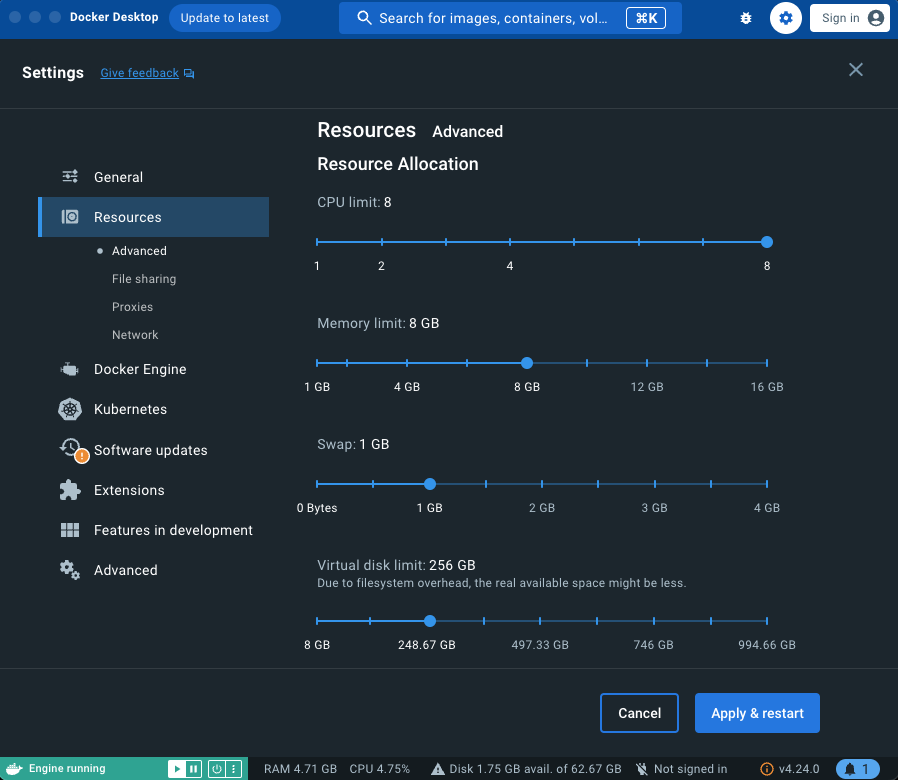
Click on the Settings icon in the top right corner, then click Resources. You will see the Resource Allocation sliders set to their default positions.
-
Set the resource allocations as follows:
- CPU limit: Set to at least 6 cores. For better performance, increase to 8.
- Memory limit Set to at least 8 GB. For better performance, increase to 16 GB.
- Virtual disk limit: Set to between 128 GB and 256 GB.
-
Click Apply & restart.
Docker is now installed and ready for the installation of AtScale Developer Edition.