Refreshing Dataset Schemas
The schemas for database tables and views can change over time. Design Center allows you to refresh your datasets to pick up recent changes from the data warehouse; for example, if new columns were added.
Before you begin
When refreshing dataset schemas, be aware of the following:
- If the schema for the source data changes, you should first update the table definition in the data warehouse, then refresh the dataset schema in Design Center to get the latest dataset columns from the table definition.
- If existing column names change, you may need to manually fix relationships and calculated column formulas that use the old column names.
- For query-based datasets (QDSs), if the name of the table changes in the data warehouse, you must update it in the selection SQL for the QDS before refreshing the schema.
- If your data warehouse contains column descriptions that have been inherited by model objects in AtScale (metrics, levels, etc.), any changes made to the descriptions in the data warehouse will be reflected in the objects' descriptions when you refresh your dataset schemas.
Refresh a dataset schema
-
In Design Center, go to the Workspace panel.
-
Locate the dataset you want to refresh, click its context menu and select Refresh Dataset.
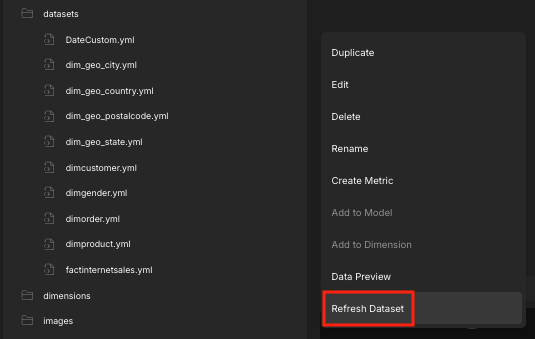
The dataset updates with the latest changes from the data warehouse.