About Join Behavior
When a query involves data from two different datasets, AtScale uses the relationships defined in the model to plan how to join the underlying tables in the connected data warehouse. This section explains the join behavior considered by the AtScale query engine.
The actual SQL join type chosen by the AtScale engine is based on the optimal path to the data requested in the query. When this documentation talks about SQL join types, it is only to illustrate the matching and filtering behavior associated with the relationships defined in your AtScale models.
About Right vs Left Join Behavior
The default behavior is to filter out the fact data rows that do not have a matching entry in the dimension. In SQL, this is referred to as right join behavior, meaning the dimension dataset is used as the basis of comparison when combining data from multiple tables in the connected data warehouse.
For example, if this Sales fact dataset was being joined to this Customer dimension, then only customers A, B, and C would be in the result (customer D would be excluded because it has no matching entry in the dimension dataset).
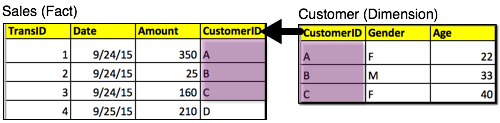
AtScale models do not support left join type relationships at this time.
About Inner vs Outer Join Behavior
The default behavior is to exclude dimension members that do not have corresponding fact rows. In SQL, this is often referred to as inner join behavior, meaning there must be a match in both tables for a result to be included.
For example, if this Sales fact dataset was being joined to this Customer dimension, then only customers A, B, C, and D would be in the result (customer E and F would be excluded because those customers do not have records in the fact data).
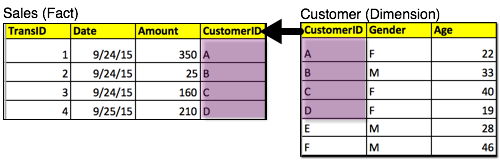
In some cases, you may want to see all dimension members regardless if they have fact data or not. You can configure per dimension hierarchy if you want this outer join type behavior instead. In this case, customer E and F would be in the result, but the sales amount would be NULL (empty) for those customers.